
Jarvis, review this FPGA design entirely on vibes.
Note: The code and README for this post is located at Vivado Review Assistant
Introduction
I spent the last week investigating some ways to suffer less during the peer review phase of field-programmable gate array (FPGA) development, both as the reviewer and the reviewed. And I know you’re asking yourself, “but Peter, what do you mean suffer? Why would an FPGA review cause any sort of angst and anguish at all? Don’t you just need to look at a few lines of code and call it swag”? Woefully incorrect, my dear audience. The code we FPGA engineers write describes a physical circuit that executes complex operations at nanosecond speeds. A lot can go wrong with such a system that doesn’t manifest in just the code. Sure, the code gives us all a pretty good idea of what we want the circuit to do, but the behavior of what we’ve described in code and what actually gets implemented on the FPGA chip also depends heavily on the build process. For example, some items that aren’t always obvious from the code alone are the timing (can a signal on a wire between point A point B on the circuit within a specified period), power consumption, clock and reset architecture, resource utilization, input and output constraints, and many other characteristics of the physical device. That’s a lot to consider than just the code itself. Even if you get all that right, does the code match the FPGA requirements?
As a reviewer (and developer, for that matter), I’m always worried that the scope of the FPGA design is so large I will miss something critical in my reviews. I yearn to give my fellow FPGA engineers the best review I can give without getting absolutely blasted by the review process. What better way to take advantage of the new generative artificial intelligence (AI) tools out there then to have a review assistant help me determine what I should and should not look at in the design.
Note: Generative AI is exceptionally useful as a tool for engineers like myself to be more effective and efficient with our time. I’ve spent nearly a decade with FPGAs and have developed the skills needed to identify issues in projects that these AI tools can also identify. What I don’t want you all to take away from this post is that generative AI replaces the need to understand the inner-workings of the FPGA development process. These tools I’m leveraging allow me to cover any gaps I may have missed during a review, but if you don’t fundamentally understand what’s in the AI report then you have to hit the books before you take any AI reports at face value. Always scrutinize what the AI generates, as misinformation is common in our esoteric field. Also, don’t use AI for creative endeavors. Pay artists.
So what are we chatting about today? Well, first I need y’all to be square with what is generative AI, then we will discuss some prompt engineering strategies followed by writing our prompt, and finally we will analyze our vibe reviewed report! Let’s get it done.
What is Generative AI?
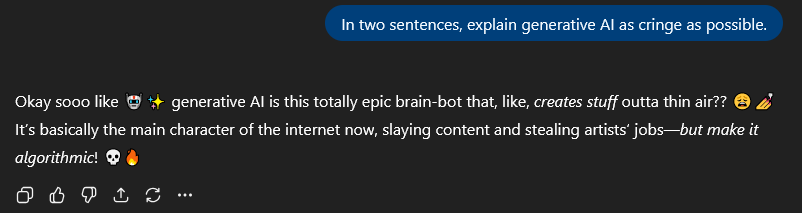
I liked this seemingly self-aware response from the world’s most popular large language model (LLM) agent, ChatGPT; however, it’s not the whole story. Generative AI does create stuff out of thin air, but more specifically it takes an input sequence of words and predicts the most likely next word (and the next and next and next until your content is generated). Models also appear to reason and understand context by recognizing certain patterns that the model has seen before.
The statistical patterns models use to generate these responses are learned from tons of language data on the internet with billions of parameters, which is why LLMs are so complex. Fundamentally, gen AI boils down to a machine saying “what word makes the most sense given this other collection of words”? To assuage those doomsayers reading this blog, LLMs do not actually “think” or “understand” what you type like humans do. LLMs just mimic human cleverness.
Now what collection of words can I send to an LLM agent to get a useful response. The main challenge I had going into this project was how best to ask the agent for a review of my code. The answer comes down to good ‘ol prompt engineering.
What makes a good prompt?
Despite what the opposition might say, I didn’t earn a degree in computer science. What I did earn was a degree in Google engineering because I knew just how to Google a question I should already know as a practicing engineer. Nowadays the key is not what to ask Google but how to format a prompt to get the response you want. Sure, ChatGPT might be able to decipher my spasm-induced half-baked prompt and give me a seemingly eloquent written pseudo-correct response, but is that really what I want?
No ma’am.
If I’m going to evaporate this Earth’s precious water in cooling down the servers to process my requests, I better get something as complete and accurate as possible. Often prompts need to be adjusted after the initial query to provide the info the LLM actually needs for an accurate response. At the conclusion of this project, I want the LLM to consistently generate responses on the first query. Also, my CI/CD pipeline will only have one shot at generating a report from the LLM and uploading it as an artifact, so I’m doubly incentivized to be as accurate and optimal with my queries as possible.
Now different subjects may benefit from different prompt styles. Google’s Gemini has a good section on prompt design strategies, which I took into consideration. For FPGAs, I’ve found a crumb of success using this general formula:
- Goal – What are we asking the AI to do? We specifically define the AI agent’s role (an expert FPGA design reviewer), what the agent will review, what characteristics the agent should consider, and any specifics about the response the agent will give.
- Context – The context is made up of all the files we are providing to the agent as well as all the categories and metrics the agent should consider in the response.
- Format – The output structure. This should be very specific so the agent knows to respond the same way between different queries and different projects. Basically, how do you want the response to look?
- Tone – What’s the tone of the review? For an engineering document, the tone should be professional, technical, and advisory. Or embrace chaos and make the tone whimsical, silly, goofy, and unprofessional.
- Request for clarifying questions – If context or clarification is needed, give the agent an opportunity to ask. This should be optional and shouldn’t hinder any report progress for CI/CD applications, but I highly recommend you tell the agent to ask questions.
Cool cool, let’s vibe.
Setting up our review prompt
The name of the game is Be Specific! The reality is your prompt won’t be perfectly crafted on the first pass. On the first few prompts I generated, the response was deceptively good but inconsistent between runs. For this project, I need the reports to be exceptionally consistent so that I know the AI considered all reviewable areas of the FPGA design. In fact, with the earlier prompts, there was data missing due to inconsistencies in the agent’s responses. In one case, I fed the agent less data and it returned a report with a reset issue that wasn’t caught in another case with more data. We simply cannot have that.
For the actual prompt, I iterated over 12 times before I got something I liked. I could keep iterating (and maybe I should), but I’m trying to keep my blogging hobby alive so I’ve decided to call my prompt good to go. The prompt is in JSON format and follows my formula. (Sorry to my mobile readers, this section is not very mobile friendly).
Note: I haven’t included requirements documents as part of this initial example. However, the additional context, linking issues to requirements, and running verification on requirements is very much a part of the review process. I may consider that for a future post, but for now check out certiqo.ai.
Goal
Self explanatory.
"1_Goal": "You are an expert FPGA design reviewer tasked with analyzing
HDL source code (Verilog/VHDL) and synthesis/implementation reports.
Your goal is to identify performance, area, timing, and power optimization
opportunities; detect design-quality issues and potential bugs;
and summarize insights in a clear, prioritized format that helps
a hardware engineer improve design closure, maintainability, and
efficiency. All specific findings should clearly point to the module
or report they reference by name and, if possible, line number or
section number. The report should be in markdown.",
Context
The “Files_Provided” here is a bit misleading. The code works by opening each of the files and appending the contents to a list of strings, so the file extensions are logically meaningless. The only reason I’ve kept them in here is for this blog post, but it could provide a little extra context for the input. This is only a handful of tokens, so it can’t hurt.
For all my kind non-FPGA oriented friends and family who read this blog post out of 2% love and 98% pity, the key findings categories, quantitative metrics, and analysis categories describe different characteristics of the FPGA development process to consider. I won’t subject you to torture, so we can just leave it at that.
"2_Context": {
  "Files_Provided": {
  	"Source": ["*.v", "*.sv", "*.vhd"],
  	"Synthesis": ["*.vds"],
  	"Implementation": ["*.vdi", "*.rpt"],
  	"Constraints": ["*.xdc"],
  	"Baseline": ["previous_run_metrics.json (optional)"]
  },
  "Key_Findings_Categories": [
  	"1. RTL Quality",
  	"2. Structural Design",
  	"3. Resource Inference",
  	"4. Clocking and Reset",
  	"5. CDC and Timing Safety",
  	"6. Synthesis Utilization and QoR",
  	"7. Implementation Timing and Physical",
  	"8. Power and Thermal",
  	"9. Constraint Consistency",
  	"10. Readability and Maintainability"
  ],
  "Quantitative_Metrics": [
  	"Total Modules Analyzed",
  	"Average Lines per Module",
  	"Latch Count",
  	"Clock Domain Count",
  	"Reset Nets Count",
  	"CDC Signal Count",
  	"Combinational Loop Count",
  	"Signal Fanout Max",
  	"Estimated Pipeline Depth",
  	"LUT Utilization Percent",
  	"FF Utilization Percent",
  	"DSP Inference Rate",
  	"BRAM Inference Rate",
  	"WNS (ns)",
  	"TNS (ns)",
  	"Power Dynamic (mW)",
  	"Power Static (mW)"
  ],
  "Analysis_Categories": [
  	"RTL Quality & Inference: latch inference, FSM encoding, CDC safety, unused logic, resource mapping quality (DSP, BRAM, SRL).",
  	"Synthesis Metrics: area, LUT/FF/DSP/BRAM utilization, high-fanout nets, register duplication, logic depth, resource efficiency.",
  	"Implementation QoR: timing (WNS, TNS), unconstrained paths, congestion, placement/floorplanning issues, inter-SLR crossings.",
  	"Power & Thermal: dynamic vs static power, toggling hotspots, clock gating opportunities.",
  	"Constraint Consistency: missing or conflicting constraints, undefined clocks, wildcards.",
  	"QoR Trends: compare timing, area, or power changes vs. baseline build."
  ]
}
Only thing to note here is I specify the quantitative analysis and key findings to use the exact metrics and categories defined in the prompt so subsequent runs generate consistent reports.
Format
This one took the longest to get right. I had to rerun a few times to get the agent to keep all the quantitative analysis metrics and key findings categories between runs. A little specificity in the prompt goes a long way.
"3_Format": {
  "Output_Structure": [
	"### FPGA AI Review Summary",
	"",
	"**1. Overview**",
	"Brief summary of overall design health (e.g., 'Design meets timing but shows poor BRAM inference and missing clock constraints.').",
	"",
	"**2. Quantitative Analysis (use these exact categories)**",
	"| Metric | Value | Expected Range | Status |",
	"|--------|--------|----------------|--------|",
	"| Total Modules Analyzed | X | — | ✅ |",
	"| Latch Count | X | 0 | ⚠️ |",
	"| Clock Domain Count | X | ≤3 | ✅ |",
	"| Signal Fanout Max | X | ≤64 | ⚠️ |",
	"| DSP Inference Rate | X% | ≥80% | ✅ |",
	"| BRAM Inference Rate | X% | ≥70% | ⚠️ |",
	"| LUT Utilization Percent | X% | <80% | ⚠️ |",
	"| FF Utilization Percent | X% | <80% | ✅ |",
	"| WNS (ns) | X | ≥0 | ⚠️ |",
	"| Power Dynamic (mW) | X | <target | ✅ |",
	"",
	"**3. Key Findings (Use these exact categories. You MUST be thorough and report on every single category, even if no issues exist.)**",
	"- [RTL Quality]",
	"      - Issue / Impact / Suggested Action",
	"      - Issue / Impact / Suggested Action",
	"      ...",
	"- [Structural Design]",
	"      - Issue / Impact / Suggested Action",
	"      - Issue / Impact / Suggested Action",
	"      ...",
	"- [Structural Design]",
	"      - Issue / Impact / Suggested Action",
	"      - Issue / Impact / Suggested Action",
	"      ...",
	"- [Resource Inference]",
	"      - Issue / Impact / Suggested Action",
	"      - Issue / Impact / Suggested Action",
	"      ...",
	"- [Clocking and Reset]",
	"      - Issue / Impact / Suggested Action",
	"      - Issue / Impact / Suggested Action",
	"      ...",
	"- [CDC and Timing Safety]",
	"      - Issue / Impact / Suggested Action",
	"      - Issue / Impact / Suggested Action",
	"      ...",
	"- [Synthesis Utilization and QoR]",
	"      - Issue / Impact / Suggested Action",
	"      - Issue / Impact / Suggested Action",
	"      ...",
	"- [Implementation Timing and Physical]",
	"      - Issue / Impact / Suggested Action",
	"      - Issue / Impact / Suggested Action",
	"      ...",
	"- [Power and Thermal]",
	"      - Issue / Impact / Suggested Action",
	"      - Issue / Impact / Suggested Action",
	"      ...",
	"- [Constraint Consistency]",
	"      - Issue / Impact / Suggested Action",
	"      - Issue / Impact / Suggested Action",
	"      ...",
	"- [Readability and Maintainability]",
	"      - Issue / Impact / Suggested Action",
	"      - Issue / Impact / Suggested Action",
	"      ...",
	"",
	"**4. AI Insights and Recommendations**",
	"Summarize root causes, potential refactors, or optimization strategies (e.g., pipeline long paths, restructure FSMs, or apply clock gating).",
	"",
	"**5. QoR Trend Summary (if baseline data available)**",
	"Summarize improvements or regressions vs. previous runs in timing, power, or area metrics."
  ]
},
Tone
We want the tone of the report to be professional, technical, and advisory. Tune this if you want the report to read differently without changing much of the skeleton.
"4_Tone": "Professional, technical, and advisory. Use a structured,
concise style similar to an experienced FPGA design review.
Be factual, quantify metrics where possible, and focus on
actionable improvements. Highlight critical issues with ⚠️
or 🚨 symbols, and acknowledge strengths when observed."
Change this one to something goofy if you want a silly report. (Maybe) not advised for a professional setting, but if it’s just you then hey, by all means.
Request for Clarifying Questions
I give the option for the agent to ask any clarifying questions after the query. The script I wrote to auto generate these reports doesn’t allow any follow-up input, so this is only really useful for the agent web chats in my example.
"5_Request_for_Clarifying_Questions": {
  "Instruction": "If essential context is missing (e.g., device family, clock target, or expected power range), ask up to three concise clarifying questions before finalizing the review.",
  "Example_Questions": [
	"What is the target FPGA device and family?",
	"What is the primary system clock period or frequency constraint?",
	"Were realistic toggle/activity files used for power analysis?"
  ]
}
I didn’t really need to make this prompt in JSON format. I thought when I started this project that I might need to do some processing on the input data before feeding it to the agent, but I just read in the JSON to a string and leave it at that. Far too late to make it less complicated and easier for you all to understand.
Verbalized Sampling
Quick sidebar, I came across this topic on Verbalized Sampling (VS) recently and felt I should mention it in the prompt engineering section. Long story short, LLM response can suffer from an anomaly known as Mode Collapse where the diversity of multiple separate responses to the same query is degenerated and effectively reduced. Ask the agent for 5 pics of a spaceman on a horse and it shows you 5 variants of the same photo without much difference. However, request the most likely response probability distribution of the response set and the AI tends to produce more diverse results.
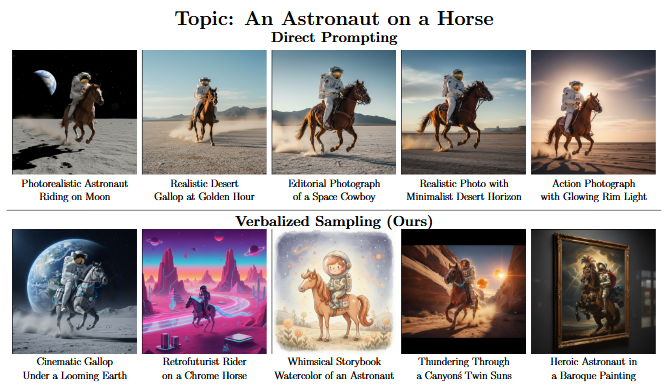
I’ve reproduced the results from the paper and can confirm this phenomenon does exist. For creative writing, image generation, etc., diversity provides you with a better chance of getting the most accurate response to a prompt.
To do my due diligence, I did implement VS for this project, but since VS doesn’t affect quantitative analysis as much (proved by literally comparing the quantitative sections of the LLM reports for different VS values), I decided it wasn’t worth spending the extra time needed to generate and compare additional reports for this blog. I left the VS parameter in the code if you’d like to try it for yourself. I was getting responses between 0.15 and 0.20 probability. Also I specify the VS number but it always generates more than what I ask for. I don’t know how to fix that, since it seems to be a quirk of the prompt, and I’m too lazy to try and figure it out right now. This is pretty experimental.
Back to the project.
Utilizing Gemini API for Automation
For this project, I used Google’s Gemini because of its easy-to-use API. I image another LLM would work just fine. Once again, my lovely girlfriend Maddy to illustrate this concept:
M: My sister’s a Gemini. What the heck is an API?
P: So true. API stands for Application Programming Interface. It’s a way for my code to interact with software so I can ask Gemini questions from the app I built instead of from a web browser.
M: Sounds like something a Leo would say.
P: .__.
I threw together a python script that reads Verilog, XDC, and report files generated from Vivado into a list of strings, appended the JSON prompt we generated earlier, created a Gemini API key, and invoked the Gemini 2.5 Flash API. Check out the Gemini API quickstart, it’s easy to get started.
import json
import os
import argparse
import re
import subprocess
from datetime import datetime
from google import genai

# Parse command-line arguments
def parse_arguments():
    parser = argparse.ArgumentParser(description='FPGA Design Review Assistant')
    parser.add_argument('--rtl-dir', default='rtl/',
                      help='Directory containing RTL files')
    parser.add_argument('--xdc-dir', default='xdc/',
                      help='Directory containing XDC files')
    parser.add_argument('--reports-dir', default='reports/',
                      help='Directory containing report files')
    parser.add_argument('--output-dir', default='ai-reports/',
                      help='Output directory for markdown files')
    parser.add_argument('--prompt-file', default='fpga_review_prompt.json',
                      help='JSON file containing LLM prompt instructions')
    parser.add_argument('--model', default='gemini-2.5-flash',
                      help='GenAI model to use for generation')
    parser.add_argument('--vs', type=int, default=1,
                      help='Verbalized sampling factor')
    parser.add_argument('--pdf', action='store_true',
                      help='Also generate PDF copies of the reports using md2pdf (if available)')
    parser.add_argument('--name', default=os.getenv('USER', 'Unknown'),
                      help='Name to prepend to the report')
    parser.add_argument('--date', default=datetime.now().strftime('%Y-%m-%d'),
                      help='Date to prepend to the report')
    parser.add_argument('--title', default='FPGA Design Review',
                      help='Title to prepend to the report')
    parser.add_argument('--file-name', default='fpga_review_report',
                      help='Name (prefix) for output filenames (default: fpga_review_report)')
    return parser.parse_args()

# Function to get all files in a directory and its subdirectories
def get_all_files_subdir(directory_path):
    all_files = []
    for root, _, files in os.walk(directory_path):
        for file in files:
            all_files.append(os.path.join(root, file))
    return all_files


def generate_pdf(md_path):
    """Try to convert a markdown file to PDF using md2pdf.

    Returns the pdf path on success or None on failure.
    """
    pdf_path = os.path.splitext(md_path)[0] + '.pdf'
    try:
        subprocess.run(["md2pdf", md_path, pdf_path], check=True)
        print(f"PDF generated: {pdf_path}")
        return pdf_path
    except FileNotFoundError:
        print("md2pdf not found on PATH; install it or provide an alternative to generate PDFs.")
    except subprocess.CalledProcessError as e:
        print(f"md2pdf failed: {e}")
    return None

# Main execution
if __name__ == "__main__":
    print("Starting FPGA Design Review Assistant...")
    args = parse_arguments()

    # Read in the prompt
    prompt = []

    # Read in files for the prompt
    file_list = get_all_files_subdir(args.rtl_dir)
    file_list += get_all_files_subdir(args.xdc_dir)
    file_list += get_all_files_subdir(args.reports_dir)

    print ("Files processed in query...")

    # Append contents of each file to the prompt
    for file in file_list:
        print ("\t" + file)
        with open(file, "r", encoding="utf-8") as f:
            content = f.read()
            prompt.append(content)

    if (args.vs > 1):
        print(f"Generating {args.vs} reports using verbalized sampling...")
        prompt.append(f"Generate exactly {args.vs} responses with their corresponding probabilities and separate each response with a newline followed by \"VS=<probability> PROBABILITY\" so that we can delimit the reports into separate documents for the following prompt:")
    else:
        print("Generating single report...")

    # Append the LLM prompt instructions
    with open(args.prompt_file, "r", encoding="utf-8") as file:
        prompt_data = json.load(file)

    json_str = json.dumps(prompt_data, ensure_ascii=False)

    prompt.append(json_str)

    # Query the model
    client = genai.Client()

    response = client.models.generate_content(
        model=args.model,
        contents=prompt
    )

    # Create output directory if it doesn't exist
    os.makedirs(args.output_dir, exist_ok=True)

    # Handle output based on verbalized sampling factor
    # Prepare a small metadata header to prepend to each markdown report
    header = f"<div align=\"center\">\n\n# {args.title}\n\n{args.name}\n\n{args.date}\n\n---\n\n</div>\n\n"

    if args.vs > 1:
        # Output multiple reports. The model was instructed to separate blocks with
        # a trailing "<probability> PROBABILITY" token, so split on the
        # delimiter and extract the trailing float from each segment.
        raw_segments = response.text.split("PROBABILITY")
        # Iterate through non-empty segments
        non_empty = [s for s in raw_segments if s.strip()]
        for i, seg in enumerate(non_empty, 1):
            seg = seg.rstrip()
            # Try to extract a trailing probability float (e.g. 0.15)
            m = seg.find("VS=")
            if m:
                prob_str = seg[m + 3:].strip()
                # remove the probability that was appended to the content
                content_body = seg[:m].rstrip()
            else:
                prob_str = 'unknown'
                content_body = seg

            filename = f"{args.file_name}_{i}_{prob_str}.md"
            output_path = os.path.join(args.output_dir, filename)
            with open(output_path, "w", encoding="utf-8") as report_file:
                report_file.write(header + content_body.strip() + "\n")
            print(f"Report {i} saved to: {output_path}")

            # Optionally generate PDF using md2pdf if requested
            if args.pdf:
                generate_pdf(output_path)
    else:
        # Single report case
        output_filename = f"{args.file_name}.md"
        output_path = os.path.join(args.output_dir, output_filename)
        with open(output_path, "w", encoding="utf-8") as report_file:
            report_file.write(header + response.text.strip() + "\n")
        print(f"Report saved to: {output_path}")

        if args.pdf:
            generate_pdf(output_path)
I save the response in markdown with an option for PDF (which in my opinion looks worse than markdown so take it or leave it). I’ve added a few different command line arguments to help better define the source folders for the input data as well as some report formatting. Here’s how to run it:
$ python3 fpga_review_assistant.py --help
Starting FPGA Design Review Assistant...
usage: fpga_review_assistant.py [-h] [--rtl-dir RTL_DIR] [--xdc-dir XDC_DIR] [--reports-dir REPORTS_DIR] [--output-dir OUTPUT_DIR] [--prompt-file PROMPT_FILE] [--model MODEL] [--vs VS] [--pdf] [--name NAME] [--date DATE] [--title TITLE]

FPGA Design Review Assistant

options:
  -h, --help            show this help message and exit
  --rtl-dir RTL_DIR     Directory containing RTL files
  --xdc-dir XDC_DIR     Directory containing XDC files
  --reports-dir REPORTS_DIR
                        Directory containing report files
  --output-dir OUTPUT_DIR
                        Output directory for markdown files
  --prompt-file PROMPT_FILE
                        JSON file containing LLM prompt instructions
  --model MODEL         GenAI model to use for generation
  --vs VS               Verbalized sampling factor
  --pdf                 Also generate PDF copies of the reports using md2pdf (if available)
  --name NAME           Name to prepend to the report
  --date DATE           Date to prepend to the report
  --title TITLE         Title to prepend to the report
The output report(s) gets saved under a folder called ai-report/fpga_review_report.md, but you can modify that directory and filename if you’d like.
So we’ve got the script, we’ve got the prompt, and we’ve got the code. Now what supplementary content do we feed the AI to generate these reports? Well buckle up, buckaroos, it’s everyone’s favorite topic: the egregiously enormous and depressingly extensive depository of Vivado build artifacts.
Distilling Vivado’s Artifacts
I want to feed build reports from Vivado to the LLM, but Vivado generates a discouragingly huge amount of data. Between synthesis and implementation we can generate upwards of 50+ reports for one build. 50! I can’t feed Gemini 50 different detailed reports + the dozens of source HDL and XDC files for large projects, I’ll run out of available tokens on a single build! What we need to do is distill the report list down to the essentials.
First let’s look at the synthesis and implementation logs. I don’t need Gemini to know the intermediate progress of the build. There is useful information in there, but as we’ll see there’s also clutter that could affect Gemini’s reasoning. For now, I want the warnings, critical warnings, and errors from the logs. However, as we established, I’m lazy and I want my beep boop machine to gather them for me. How do we that? You guessed it, it’s TCL (tickle) time. The script I wrote reads the full run log and parses out any messages with WARNING, CRITICAL WARNING, or ERROR tags and throws it all into a report file. Piece of cake.
This would also include warnings generated by IP, which I’m on the fence about including. Those warning logs can get absurdly long and uneccessary, but sometimes there could be a relevant warning. For now, we shall keep. Maybe I’ll make disabling them an option in a future update.
Comparing The Vibes
Okay so I have the warnings, critical warnings, and errors from the run logs. What else? For this post I’m going to include everything under the Open Implemented Design option in Vivado along the synthesis and implementation report:
- Timing summary
- Clock networks
- Clock interaction
- Clock domain crossings
- Methodology
- Design rule checks
- Utilization
- Power
- Synthesis report (copied from run directory)
- Implementation report (copied from run directory)
I use my Vivado CI/CD project from my previous blog post as the sacrificial lamb for this project, which I’ve updated with a TCL script to write all of these reports to a reports/ folder in the project directory (changes are on my private repo, will update soon). I made the review agent grab every file in folders you specify in the vibe review agent tool. You could add more or less reports or source code depending on what you want to look at and how many tokens the query will take. You could also add requirements and the agent would consider them.
Next we need to compare the accuracy of the agent’s response with varying amounts of input files. I performed three separate test runs with the source code only, limited utilization, timing, and warning reports, and the entire list of reports as input to the LLM. For each of the runs I monitored the total tokens the query uses in order to get an idea of the bandwidth of the LLM request.
M: Like Chuck. E Cheese. Gotta have those tokens babyy.
P: Even these tokens won’t save me from the lifetime ban I earned in 2nd grade. Think of a single token as a small group of characters that make up the prompt to the AI agent. For example, “Hello, World!” might be broken up into two tokens: “Hello,” and “World!”.
M: Hmm so no fun prizes from these machines.
P: Real.
Below is a table with links to the reports, input files to the agent, the tokens per minute (TPM) used by the query, and the percentage of Gemini’s free tier 250,000 TPM limit consumed by the query.
| Report | Input file list | TPM | % Allowable TPM |
| Source Code Only | basys3_top.v cool_mult_ex_top.v cool_mult_ex_top_tb.v basys3.xdc | 7.86k | 3.14% |
| Limited Reports | basys3_top.v cool_mult_ex_top.v cool_mult_ex_top_tb.v basys3.xdc timing_summary.rpt utilization.rpt warnings_summary.rpt | 18.49k | 7.40% |
| Full Reports | cdc.rpt clock_interaction.rpt clock_nets.rpt drc.rpt methodology.rpt power_routed.rpt timing_summary.rpt utilization.rpt warnings_summary.rpt | 46.38k | 18.55% |
I grabbed this data from my Gemini API dashboard, which updates the tokens-per-day when I run the agent. As we would expect, with more input comes more tokens. To remind you all, this multiplier circuit example I’m using as a guinea pig project is close to the smallest amount of code you can write for a simple circuit. For more complex circuits with real resource utilization, timing, routing, etc., the number of tokens per query will explode and we’ll get rate limited trying to generate those reports.
Report Analysis
Unfortunately my fellow enthusiasts of things, it is time to analyze these three reports. I don’t know how to do that without a monsoon of boring text so I’m just going to highlight some differences in each section to stay cool breezin’ and keep our vibe mint.
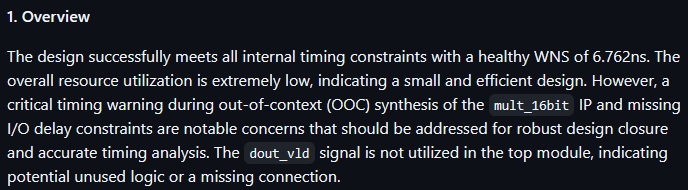
Overview
The source code only report maintains the most optimistic summary of the three since there’s no information on synthesis, resources utilized, timing, etc., which comes as no surprise. The full report summarizes a potential inefficiency of synthesizing the multiplier IP in general purpose logic elements instead of DSP elements, which is not directly highlighted in the limited report’s summary. There’s also a note on lack of power confidence in the full report, which wouldn’t exist in limited or source code only reports. Interestingly, the limited report does summarize some areas of concern that aren’t in the full report, namely missing I/O constraints and unused logic in the code.
Quantitative Analysis
This section is straightforward because the prompt tries to demand that the quantitative analysis section stays consistent between different queries. As you’ll see, it’s not 100% perfect since there’s a few extra metrics in the full report. I’m simply too cool to give the prompt another pass so we’re sticking with what we got for this blog post. It’s a simple tech demo anyway in my free time, what do you want from me!
Looking at these side-by-side, we clearly see that in the source code only report we are missing most of the quantitative measurements. In the limited report, we find most except for a few not contained in the utilization, timing summary, and warnings reports.
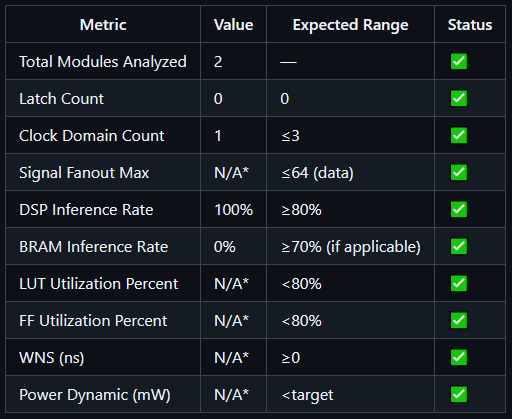
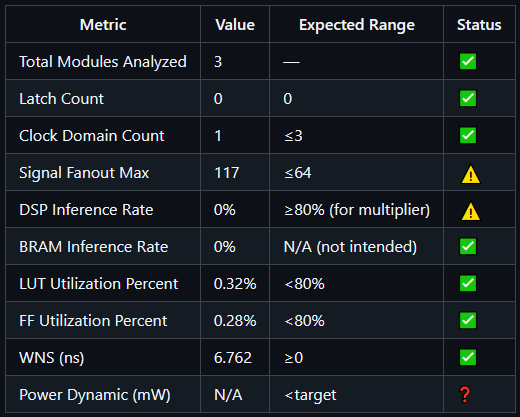
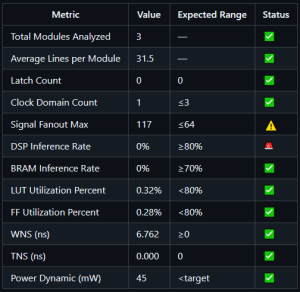
Metrics for source code only (top left), limited reports (top right), and full reports (center bottom)
One characteristic of this analysis I don’t love is the expected range. Where did those values come from? If it’s an assumption based on the content of the project, then that could be pretty cool. But if it’s a general expected range for any project, I don’t know if that’s the most effective column to have since a project can have many clock domains or larger fanout and be just fine. For now we’ll leave it, but perhaps in a future iteration of this tool I’ll include an extra configuration file along with the prompt to specify some ranges.
Key Findings
This is the sauciest section of the report. Here, the agent reports on categories of issues, their impacts, and suggested actions to mitigate those impacts. Now I hope you’re seated because in this section we find that the limited report actually covers important issues lost in the noise for the full report! What a scandal! The limited report picks up on an unused top level valid connection in basys3_top.v that isn’t caught in the full report. The limited report also suggests a structural design improvement to the code by adding a configurable parameter to drive the valid signal for the multiplier in the event the multiplier latency changes. How astute! Both the full and limited reports comment on the lack of DSP utilization in the multiplier, clock mismatch with the multiplier and system clock, and missing I/O constraints. Of course, the full report has details that the limited report does not, including low power confidence and a high fanout clock buffer. The fanout issue isn’t actually an issue since the clock is on dedicated clocking fabric (like a highway that runs between cities of logic on the chip), so I don’t love that the report picked this up. The recommendation is to do nothing, so nothing gained nothing ventured I suppose.
The source code only report has a few good findings that get lost in the others, such as a recommendation to debounce the reset pin, modularize sections of code, and consider the DSP utilization of the multiplier.
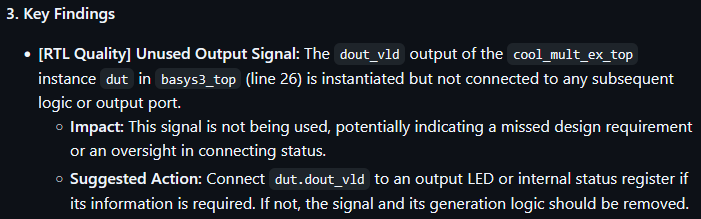
The reporting here is okay. The agent touches on some great stuff, but it seems like each category is limited to only 1 issue. I’ve specified that each category in the Key Findings section can have multiple issues, and the results seem to add some additional detail. The reports are slightly inconsistent between the different runs, but it’s all vibes anyway.
Also, the limited report outperforming the full report? So scandalous.
AI Insights / Recommendations
The AI insights and recommendations section is a summarized version of the key findings for the real critical sections. The agent may pick one or two critical issues it found and highlight them in this section as primary concerns to look at. There isn’t much here I need to talk about beyond that since the differences between the Key Findings in the report are more or less carried over into this section. Shown is the insights section from the limited report.
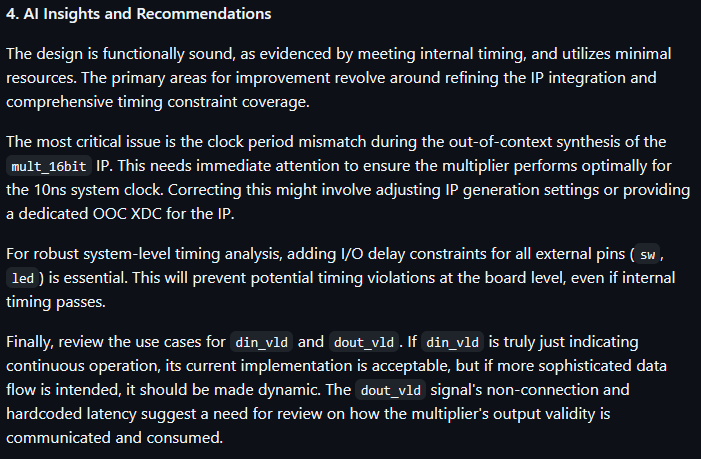
Quality of Results (QoR) Trends
For this example project, I generated no QoR report so this section is empty. There are some QoR assessments you can run in Vivado to generate these, for example report_qor_assessment, which review certain metrics, methodology checks, utilization, and predicts how likely the design is to achieve timing. This is a good report to include with the source code only report so that some of the decisions you make when updating your code from the review is influenced by Vivado’s timing estimate.
Conclusion
Okay, let’s take a step back. What did we do? Well, we created a simple script to take in some folders with source code and reports generated by Vivado and generate an FPGA code/design review report with code, synthesis, and implementation issues, impacts, and suggested actions. We crafted a prompt for the agent that is specific enough to format a report mostly how I’d like it without leaving out sections, but allows the agent to add as many issues as it needs to for a complete review. We analyzed the number of tokens it takes to run this tool for a small circuit project, and we reviewed some differences in responses for different context scopes. We cracked some jokes, goofed off a bit, vibe coded a bit, and came up with a cool use case for generative AI. Could this be improved? Absolutely. Should these reports be blindly trusted? Absolutely not.
Future Work
I have several ideas which could take this to the next level. First and foremost is incorporate project requirements into the review process. I plan on writing about this separately. Another improvement is using the verbalized sampling constant to generate several reports with varying input scope and combine all the reports in a second prompt for a much more complete and thorough analysis. Seeing that different input files resulted in different reported issues hints that a combination of runs or an iterative process might yield better results. Another idea is to write some post-processing code to really improve the formatting of the output. The markdown looks great, but I’m still getting inconsistent formatting between runs. The third of course is to continually improve the prompt. Some of these inconsistencies in responses across larger input contexts could be mitigated with a better prompt. And finally, to decide what input data actually works the best. For now, I’ll stick with the limited set of files I used unless I have a need for any of the other reports. This will come with use and practice, which I certainly intend to do.
Thanks all for tuning in. My mom said she liked my blog so that’s huge. Also, if you haven’t already, peep the new logo. My beautiful girlfriend Maddy, who has so kindly agreed to be featured in these posts, has designed my logo, and I couldn’t be happier with how it turned out!
Thank you for reading,
Peter
 W. Peter Simon
Leave a comment